Vehicle data in Verizon Connect’s software was split across five hard-to-use pages, so customers left most of it empty. I designed one page for all of it, so users can find a vehicle’s details and keep them up to date.
I led the design from research to the rollout plan, working with a product owner and two engineers.
What are the results of this work?
Monthly visits grew 2.5x, from 36K to 89K.
36K was the average across the five legacy pages over the six months before launch. The new page reached 89K and held it through the end of the year.
100% design system components, which pushed its adoption.
Retiring the legacy pages moved this whole area onto our design system, so its usage across the product went up.
The situation
Missing vehicle data left the rest of the product blind.
The vehicle area feeds data to the rest of Reveal, so when it was missing, the product was blind to the customer’s information.
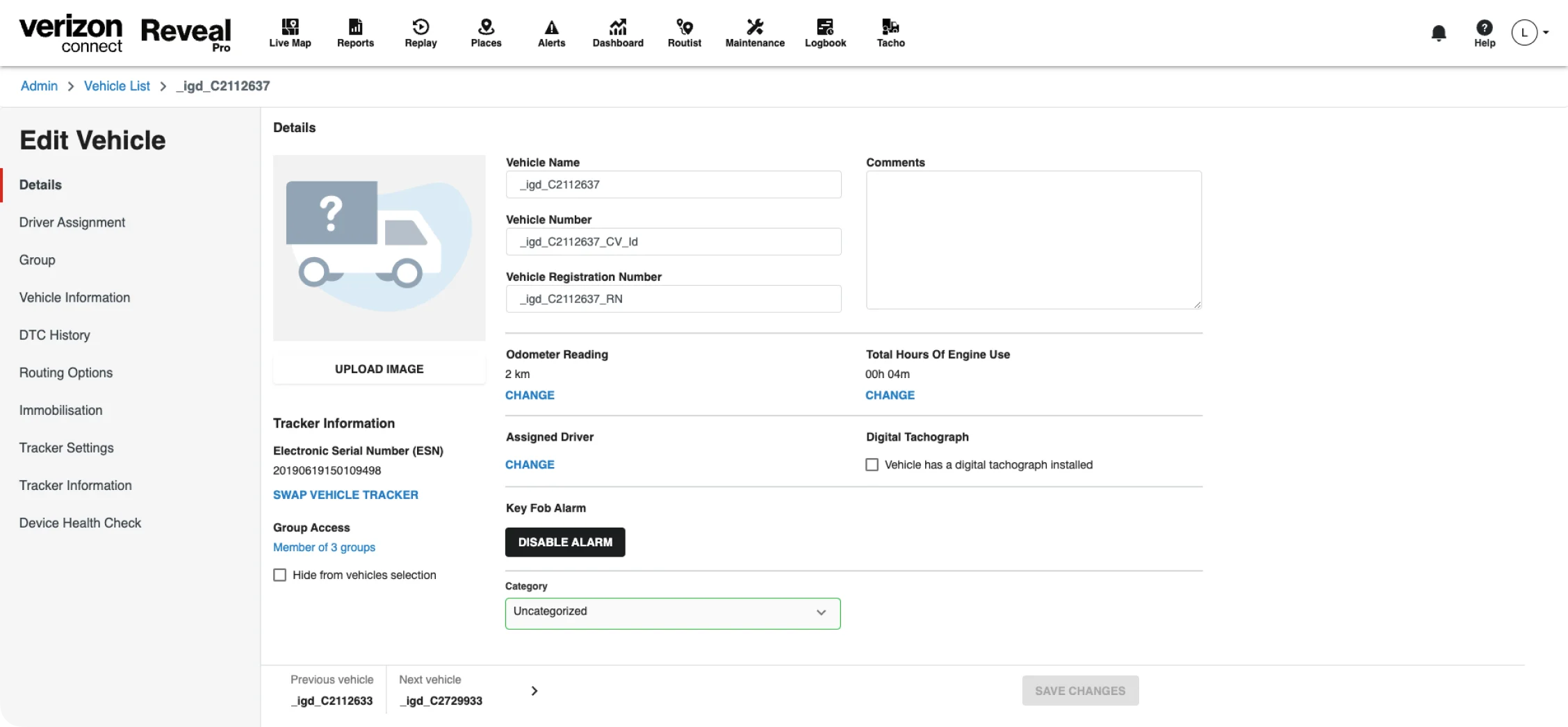
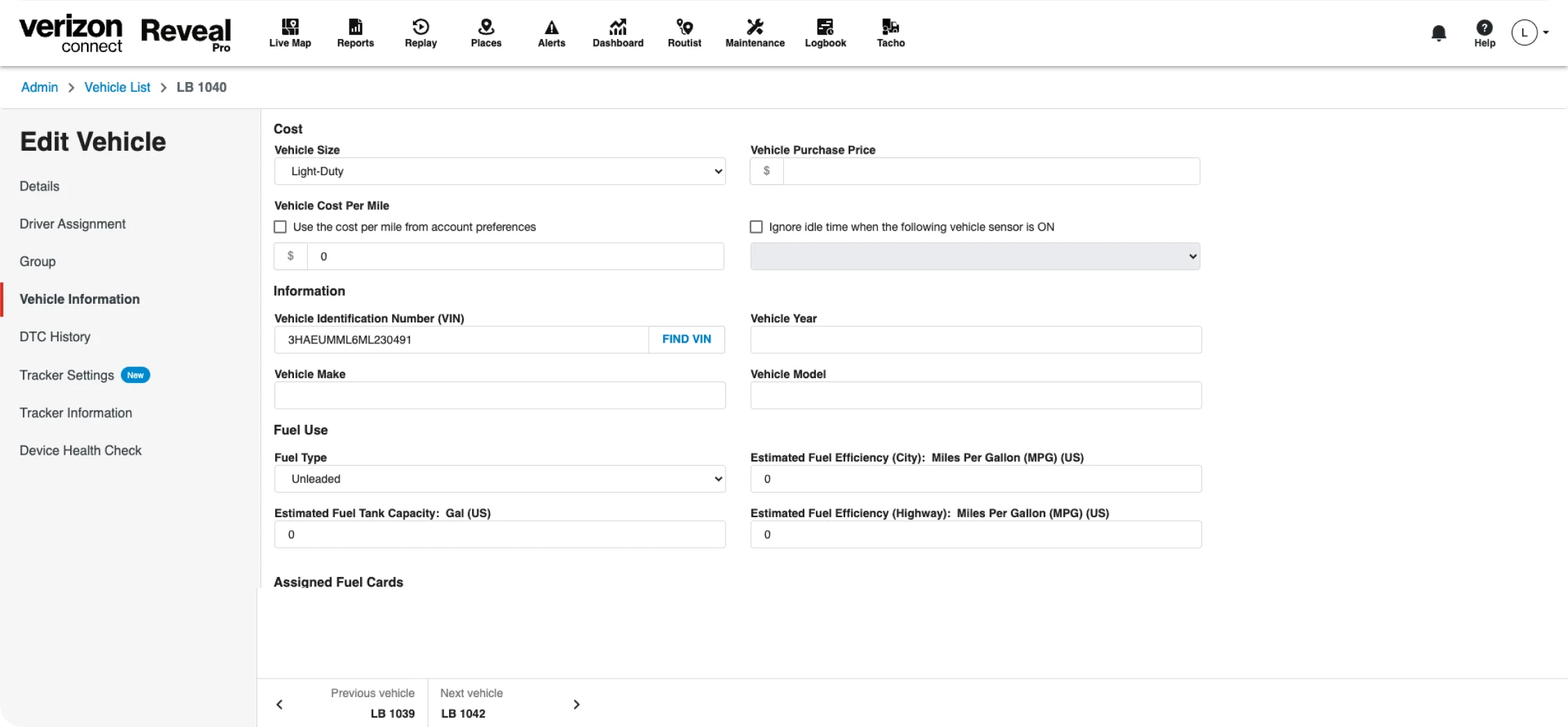
Finding one field meant knowing which of five pages held it.
Related information was split in a way that didn’t match how users think about a vehicle. That led to rage clicks, workarounds and lost time.
Every visit opened an edit form, for everyone.
The page opened in edit mode, with input fields whether or not the person could use them. People told us saving changes was frustrating, and they were afraid of changing something by mistake.
The goal
Put everything about a vehicle on one page, grouped the way fleet managers think.
Most people using this page are fleet managers, who run a company’s vehicles and drivers. They needed to find and update vehicle data without hunting for it. The business needed every legacy function carried over, in a structure that could grow with the product.

The page rises into the frame and fades in. Inside it, the van's round picture, the name VW Transporter-2 and the info row (Vehicle; Number 2232412; Driver James Jon; Group Dublin) rise into place one after another. Below sit the tabs (Overview, Driver assignment, DTC history, Immobilisation) and two modules: Usage, with an odometer of 196,000 miles and 24 hours 23 minutes of engine time, and Status, Moving, last seen at 5937 Sandy Hollow Rd, Rockford, IL.
Decision 01
Grouping the information the way users think about vehicle data.
My first question was how to group the data. The legacy pages followed how the system stored it, and building on our own guesses could break how fleet managers already connect the information.
I turned past research into a first set of groups, as a hypothesis. A card sort with fleet managers confirmed most of them, and showed where a few fields belonged instead.
The same map also helped engineering estimate the work and plan the new APIs.
8 categories feed the Fleet page, which shows 26 fields. Identification: Name, Vehicle type, Number, Driver, Group. Usage: Odometer, Engine hours. Status: Status, Last location, Last update, Fuel level. Specifications: VIN, Licence plate, Make, Model, Year, Size, Fuel type, Fuel tank capacity, Purchase price. Devices: Tracker, Cameras. Fuel efficiency: Fuel type, Fuel tank capacity, City efficiency, Highway efficiency. Costs: Cost per mile, Purchase price. Fuel cards: Assigned fuel cards. Fuel type, Fuel tank capacity and Purchase price each belong to two categories.
Decision 02
Viewing and editing became two separate modes.
The question was how to separate looking at a vehicle from changing it. I explored inline editing, different navigation and a side panel.
Inline editing lost for two reasons. The product is used in many languages, and words change a lot in length, so fields would be hard to fit in place. Some data also needed more context, like its format and a history of earlier changes.
I went with a side panel. It keeps what you see apart from what you’re editing, so I could shape the editing experience without breaking the whole page. Viewing became the default, and editing became something you choose to do.
The outcome
One page for everything about a vehicle.
Fleet managers now find everything about a vehicle in one place, and only edit it when they choose to. Visits stayed at 2.5x through the end of the year, so the new page kept its users after launch.
For the business, five pages to maintain became one, built fully on the design system.
Monthly visits grew 2.5x, from 36K to 89K.
36K was the average across the five legacy pages over the six months before launch. The new page reached 89K and held it through the end of the year.
100% design system components, which pushed its adoption.
Retiring the legacy pages moved this whole area onto our design system, so its usage across the product went up.